
Get Started with Events
Managing your events is a crucial part of maximizing the benefits of Rally Companion. Whether you’re logging past performances to update your dog’s profile or scheduling upcoming trials, this section will guide you through every step with ease.
Our intuitive interface makes it simple to enter event details, monitor your dog’s progress, and ensure all your data is organized and accessible. Follow the diagrams below to learn how to make the most of the event management features, whether you're tracking past achievements or planning for future trials.
Section 1: Setting Up an Event
In Rally Companion, setting up an event is the first step toward managing your dog’s progress, whether you're entering upcoming trials or logging historical events. In this section, you’ll learn how to input the essential details for an event. These steps are crucial for ensuring accurate records and tracking.
Event Form – Basic Details

Start by selecting the dog, event date, and host club. These are the minimum required fields to save an event. This is the foundation for organizing both upcoming and historical events.
Dog, Date, and Club
Event Form – Event Details

Enter additional event details, including location, judge, event number, and environmental factors like weather, surface type, and temperature. These details provide context for your event and help keep your records thorough.
Location, Judge, and Conditions
Event Form – Classes Entered

Select the classes your dog is entered in, such as Master, Excellent, and Advanced. This information is essential for tracking results and calculating RACH points and titles. You can enter past classes or prepare for upcoming trials.
Select the Classes Your Dog is Entered In
Section 2: Viewing an Upcoming or Historical Event
Once you’ve entered event details, you can review the event in the Event Detail view. This section will show you how to access and review your event data, whether it’s an upcoming trial or a historical event that contributes to your dog’s progress. The Event Detail view also allows you to edit events or update your dog’s profile with results.
Dog Detail View – Access Event List

Once events are added, a button becomes available in the Dog Detail view to access the Event List. This makes it easy to track all past and future events for each dog.
View Events for Your Dog
Event List – View Events for Selected Dog

The Event List view shows only the events for the selected dog, with a clear distinction between past and future events. This list is available from the Dog Detail view once events have been added.
Easily View Past and Future Events
Event Detail View – Upcoming Event

This view summarizes the key details entered for a future event, including the host club (initials), selected classes, and event information. You can edit the event at any time using the "Edit Event" button. The "Update Dog" button is disabled for future events, as there are no results to update yet.
Review and Edit Event Details
Event Detail View – Historical Event

When viewing a historical event, the data entered (such as event results, qualifying runs, and titles) will be displayed. You can use this information to update your dog’s profile, ensuring all achievements are accurately tracked.
View Entered Results and Event Info
Event Detail View – Historical Event

This section includes the calculation of total RACH points, aggregate scores, and details like event surface, weather, and temperature.
Aggregate Scores and RACH Points
Event Detail View – Historical Event

At the bottom of the Event Detail view, you can find the Event Journal, where you can add notes about the event, as well as the "Update Dog" button, which allows you to update your dog’s profile with the results from this event.
Event Journal and Update Dog
Important Disclaimer

The data you enter in My Rally Coach is for your personal tracking and information. It is not an official record and should not be used as such.
Accuracy and Personal Use
Section 3: Logging Event Results (Past or Present)
Once an event is completed, you can log the results in the Event Form. This section will guide you through inputting results for both qualifying and non-qualifying runs, recording scores, placements, and additional awards. Whether entering results from a past event or a recently completed trial, logging your dog's performance accurately will ensure your records are up-to-date.
Event Form – Qualifying Results

In this section, you can log qualifying results, including scores, placements, and whether your dog had a qualifying run. Enter scores for each class to update titles and calculate RACH points automatically.
Log Your Dog’s Performance
Event Form – Additional Awards and Notes

This section allows you to record additional awards earned at the event and enter any notes in the Event Journal. These notes can help you reflect on the experience and performance, adding personal context to the event.
Track Awards and Add Event Notes
Event Form – Non-Qualifying Results

If your dog did not qualify in a run, you can select the non-qualifying option and record the reason for the NQ. This information will help you track areas for improvement and maintain accurate records of your dog’s performance.
Record Non-Qualifying Runs
Section 4: Non-Qualifying Results
Even when a run doesn’t qualify, logging non-qualifying results is key to maintaining accurate records. This section will guide you through entering non-qualifying results and reviewing the Event Detail view, allowing you to reflect on performance and areas for improvement.
Event Form – Non-Qualifying Run
In the Event Form, select the non-qualifying option and enter the reason for the NQ. This helps track what occurred during the run, providing a detailed log of your dog's performance.
Input Non-Qualifying Results
Event Detail View – Non-Qualifying Run
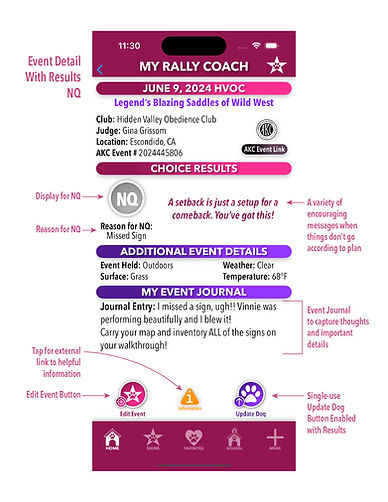
In the Event Detail view, you can see the non-qualifying run, including the reason for the NQ and an encouraging message to help maintain a positive outlook. All details are visible on a single screen for quick review.
Review Non-Qualifying Results and Reflections
Comprehensive Profile Updates with One Click
The "Update Dog" button doesn’t just make small changes—it comprehensively updates your dog’s profile to reflect every key aspect of their Rally achievements. With a single click, this button calculates and updates qualifying legs earned, tracks title progression, and accurately calculates RACH points. It even distinguishes between total points and those earned from Master classes, all based on the scores and classes entered in the event. This ensures that your dog’s profile is always up-to-date and accurate, giving you a clear and detailed view of their accomplishments.
If any adjustments are needed after committing, you can easily edit the event data or update the dog profile directly to ensure all statistics remain accurate and reflective of your dog’s true performance.
Update Dog! Why Single Use Button?
The single-use "Update Dog" button in the Event Detail View is designed to maintain the accuracy of your dog’s profile. Repeated use of this button would continually modify your dog’s legs, titles, and RACH points, potentially leading to inaccuracies. The only data that affects these key metrics are the classes entered, whether the runs are qualifying or non-qualifying, and the scores achieved. Once you commit the update, the button is disabled to prevent further changes.
If any adjustments are needed after committing, you can easily edit the event data or update the dog profile directly to ensure all statistics remain accurate and reflective of your dog’s true performance.
Update Dog Button – Ready with One Click
Click the "Update Dog" button to begin updating your dog’s profile. This is your first click—easy, right?
Update Your Dog’s Profile with One Click (Or So We Thought)
Confirming the Update – Okay, Two Clicks!

Here’s your second click! Confirm the update with this alert to finalize the changes to your dog’s profile. You’re almost done!
Just Kidding, You Need Two Clicks
Dog Profile – Before the Update

This is your dog’s profile before applying the event data. Notice the current titles, qualifying legs, and RACH points, which will be updated after the second click.
Your Dog’s Profile Before the Event Data
Dog Profile – After the Update

After two clicks, see the updated qualifying legs, titles, and RACH points reflected accurately in your dog’s profile. Everything is now up to date!